Pmax automated: CTR-driven campaigns for better performance and brand building
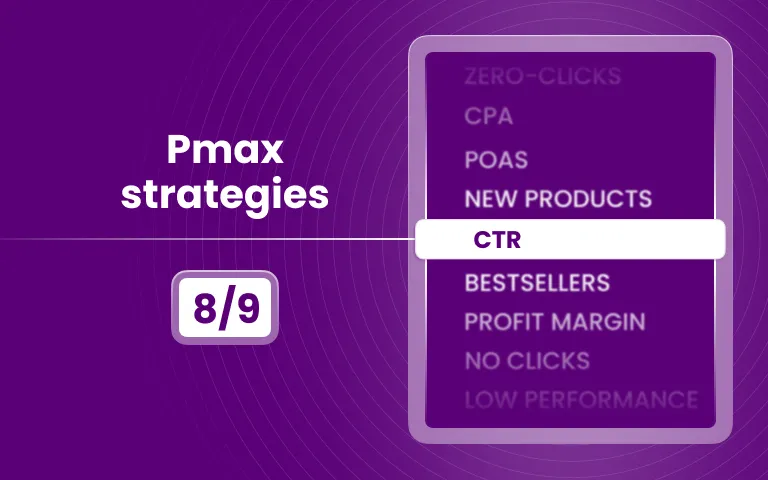


What do you need for that? You need to know the CTR of your products. And based on
How to use CTR campaign in practice
What does it take? First, you need to know the CTR of your products. This will be calculated using this formula:
CTR % = (Total Clicks / Total Impressions) x 100
Once you have that data, there are several key scenarios where a CTR strategy becomes highly effective:
1/ Brand building
Products with a high CTR attract plenty of clicks. Even if users don’t make a purchase right away, they are exploring the product, educating themselves, and getting to know your brand in the process.
A campaign built around high-CTR products focuses on the top of the funnel and aims to maximize clicks and reach.
2/ Performance improvements
You’re paying for both impressions and clicks — and high-CTR products can quickly drain your performance campaign budgets. By excluding them from your main campaigns, you not only protect ROAS but also boost the overall effectiveness of your setup. Purchases and revenue should be results you are paying for.
3/ Creative testing
As you know, CTR is a fast and reliable indicator of which creative performs best. A higher CTR shows that your product or message resonates more strongly with the audience.
That’s why it’s smart to test your creatives on high-CTR products before moving them into your main campaign. This way, you’ll gather results quickly and feed only the stronger creatives into your core setup. As a result, your main campaign will exit the learning phase faster and deliver more effective performance overall.
Important: In Google, you can’t run two creatives at the same time for the same product. To test creatives effectively, you need to split the products into two groups — for example, by using different background colors.
Why CTR could be part of your Performance campaigns
The goal of a CTR strategy is not to replace your existing campaigns but to add another layer of control and testing. This helps you gather more actionable data and build your brand more effectively.
Benefits
- Top-funnel impact: High-CTR products pull in more traffic, exposing a larger audience to your brand.
- Faster creative testing: Because they generate clicks quickly, you get statistically valid test results much sooner.
- Efficient entry point: They attract users who may return later through remarketing or other campaigns.
- Effectiveness boost: By excluding high-CTR products without enough revenue from performance-focused campaigns, you prevent them from pulling down ROAS .
Downsides
- Not suitable for performance goals: High CTR can worsen ROAS, as it often attracts users who don’t purchase.
- Lower immediate ROAS: Many of the clicks won’t convert right away, which can make performance campaigns look less profitable.
- Budget drain risk: Without strict budget caps, high-CTR campaigns can consume too much spend with limited short-term return.
Setup in Dotidot
The idea is simple: run a dedicated High-CTR product campaign in Meta and exclude those items from your main campaign. This way, you get the benefits of high engagement without letting them drag down your core performance results.
STEP 1 - Import additional product data from Meta
For CTR to work properly, you’ll need to include impressions and clicks, since CTR is calculated directly from these metrics. Here’s how to set it up:
- Navigate to your Data Source.
- Go to Data Enrichments.
- Select Meta Product Stats.
- Add the metrics Clicks and Impressions.
- Choose your time range — for this example, we’ll use a 30-day window.
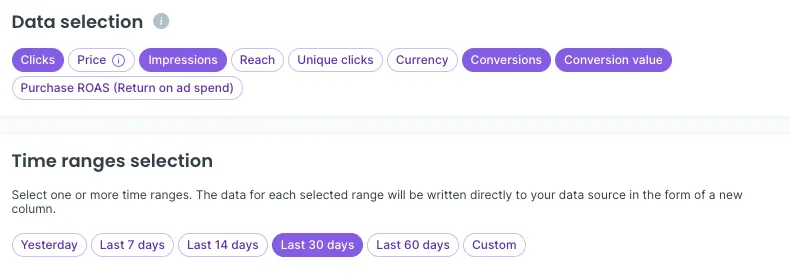
After completing this step, you’ll see two new variables in your data source: clicks_30_days and impressions_30_days.
STEP 2 - Calculate the CTR
Next, you need to create a new variable that calculates CTR from the additional data:
CTR % = (Total Clicks / Total Impressions) x 100
With this in mind, create CTR % variable:
- Navigate to your data source
- Go to Variables section and click “+”
- Choose Numeric variable
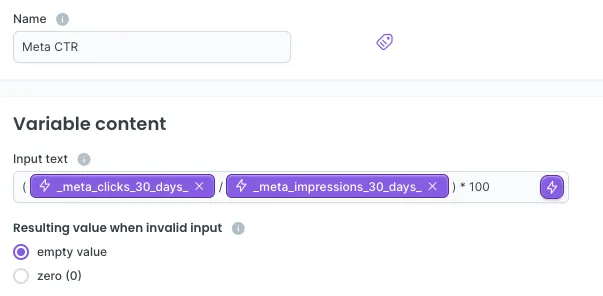
- Name it appropriately so you can easily identify it later in your data source. We’ll use “Meta CTR”
- In the Input field, replicate the formula above using data from your source
(See the image below for how it should look)
STEP 3 - Segmenting products
To set this up in Dotidot, follow these steps:
- Navigate to or stay in your data source
- Go to the Product Sets section and click "+" to create a new set
- Name the set (e.g., "High CTR" or any name you prefer)
- Select the variable containing the calculated CTR value
- Define the condition. In this example, we’ll consider High-CTR products as those with a CTR above 15%.
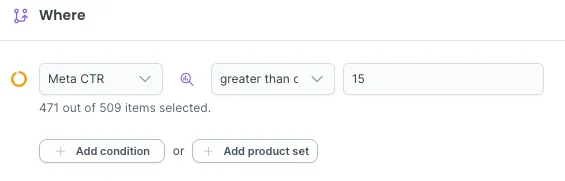
TIP: Instead of a fixed threshold, you can also use the more dynamic Highest % condition. With this option, you can always target the top 10% of products with the highest CTR.
STEP 4 - Build the campaign
The final step is the simplest: build your campaign. For High-CTR products, it’s a good idea to set up a click goal or use your own custom visit goals (for example, some of our clients prefer the Quality Visitor goal instead of plain clicks).
STEP 5 - Exclude (optional)
To improve the performance of your main Meta campaigns, you’ll need to exclude High CTR products from active campaigns to avoid having them included in multiple campaigns simultaneously.
- Navigate to the Product set used in your main campaign
- Go to Conditions
- Create a new AND condition group
- Select Add product set and choose your High CTR product set
- Make sure to EXCLUDE them
Congratulations, you have successfully set up a CTR campaign. Use it to build brand awareness, test creatives or even to boost effectiveness of your main campaigns. It’s all up to you.

'%3e%3cpath%20d='M20.5%2010.9971C20.5%205.47422%2016.0229%200.99707%2010.5%200.99707C4.97715%200.99707%200.5%205.47422%200.5%2010.9971C0.5%2015.9883%204.15684%2020.1254%208.9375%2020.8756V13.8877H6.39844V10.9971H8.9375V8.79395C8.9375%206.2877%2010.4305%204.90332%2012.7146%204.90332C13.8084%204.90332%2014.9531%205.09863%2014.9531%205.09863V7.55957H13.6922C12.45%207.55957%2012.0625%208.33047%2012.0625%209.12207V10.9971H14.8359L14.3926%2013.8877H12.0625V20.8756C16.8432%2020.1254%2020.5%2015.9883%2020.5%2010.9971Z'%20fill='%2398A2B3'/%3e%3cpath%20d='M14.3926%2013.8877L14.8359%2010.9971H12.0625V9.12207C12.0625%208.33125%2012.45%207.55957%2013.6922%207.55957H14.9531V5.09863C14.9531%205.09863%2013.8088%204.90332%2012.7146%204.90332C10.4305%204.90332%208.9375%206.2877%208.9375%208.79395V10.9971H6.39844V13.8877H8.9375V20.8756C9.97287%2021.0376%2011.0271%2021.0376%2012.0625%2020.8756V13.8877H14.3926Z'%20fill='white'/%3e%3c/g%3e%3cdefs%3e%3cclipPath%20id='clip0_6932_3540'%3e%3crect%20width='20'%20height='20'%20fill='white'%20transform='translate(0.5%200.99707)'/%3e%3c/clipPath%3e%3c/defs%3e%3c/svg%3e)
'%3e%3cpath%20d='M19.0236%200.99707H1.97639C1.58483%200.99707%201.2093%201.15262%200.932425%201.42949C0.655548%201.70637%200.5%202.0819%200.5%202.47346V19.5207C0.5%2019.9122%200.655548%2020.2878%200.932425%2020.5646C1.2093%2020.8415%201.58483%2020.9971%201.97639%2020.9971H19.0236C19.4152%2020.9971%2019.7907%2020.8415%2020.0676%2020.5646C20.3445%2020.2878%2020.5%2019.9122%2020.5%2019.5207V2.47346C20.5%202.0819%2020.3445%201.70637%2020.0676%201.42949C19.7907%201.15262%2019.4152%200.99707%2019.0236%200.99707ZM6.46111%2018.0346H3.45417V8.48318H6.46111V18.0346ZM4.95556%207.15957C4.61447%207.15765%204.2816%207.05473%203.99895%206.86381C3.71629%206.67289%203.49653%206.40251%203.3674%206.08681C3.23826%205.77111%203.20554%205.42423%203.27336%205.08995C3.34118%204.75567%203.5065%204.44897%203.74846%204.20855C3.99042%203.96814%204.29818%203.80479%204.63289%203.73912C4.9676%203.67345%205.31426%203.7084%205.62913%203.83956C5.94399%203.97072%206.21295%204.19221%206.40205%204.47608C6.59116%204.75995%206.69194%205.09348%206.69167%205.43457C6.69488%205.66293%206.65209%205.8896%206.56584%206.10107C6.47959%206.31254%206.35165%206.50449%206.18964%206.66546C6.02763%206.82643%205.83487%206.95314%205.62285%207.03803C5.41083%207.12292%205.18389%207.16425%204.95556%207.15957ZM17.5444%2018.0429H14.5389V12.8248C14.5389%2011.286%2013.8847%2010.811%2013.0403%2010.811C12.1486%2010.811%2011.2736%2011.4832%2011.2736%2012.8637V18.0429H8.26667V8.49013H11.1583V9.81374H11.1972C11.4875%209.22624%2012.5042%208.22207%2014.0556%208.22207C15.7333%208.22207%2017.5458%209.2179%2017.5458%2012.1346L17.5444%2018.0429Z'%20fill='%2398A2B3'/%3e%3c/g%3e%3cdefs%3e%3cclipPath%20id='clip0_6932_1908'%3e%3crect%20width='20'%20height='20'%20fill='white'%20transform='translate(0.5%200.99707)'/%3e%3c/clipPath%3e%3c/defs%3e%3c/svg%3e)